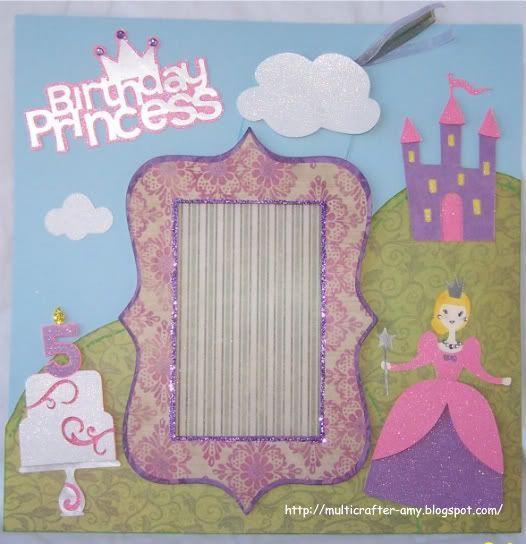
This is the first of three layouts that I made for the challenge. I could not resist trying to win the new E2 from Provo Craft. We were allowed to enter three one page 12 x12 scrapbook layouts with a birthday theme. For this one I decided to make a princess birthday theme because I have all boys and really wanted to make some girly cuts. lol I used a ton of sparkle for this layout. Sorry this is a long post do to all the details of how this page was made.
I wanted the castle to look like it was on a hill far away behind the princess.The hills in the background is made by welding two ovals together on my Gypsy. The ovals hang off the mat on the Gypsy where cutting is not needed. The frame is made with 5 layers. I used the Storybook and Plantin Schoolbook cartridges on my gypsy to create the frame. One layer was a cardstock reinforcement layer because this printed paper was not thick enough for me to pop up the first layer with foam squares. I wanted this to hold up to being place in a closed scrapbook. There are three layers for the top part then it was secured to the next two bottom layers with the foam dots. I glittered the inside of the frame with Martha Stewart glitter before attaching it to the bottom layer of the frame. Secure the bottom layer to the page before adding the top layer. It is easier to line them up straight this way.The bottom layers consisted of a cut out frame and solid behind it for the sole purpose cosmetics since we could not use a photo. Also I did not have any Princess photos, so this was a good thing for me.lol I also made this so that whoever ends up with this page can actually use the page. I left a slot unglued on the right side so a picture could be added. The title was cut from silver and metallic paper and and pink glitter paper. I cut the original candles off the the cake (from Celebrate with a Flourish) and added a number five candle. To make the candle I cut a five from the Birthday Cakes cartridge. I them cut a candle blown up for the the frame from the Celebrate with a Flourish cartridge. I just used the flame and gold Martha Stewart glitter. The white part of the cake was popped up with foam squares.
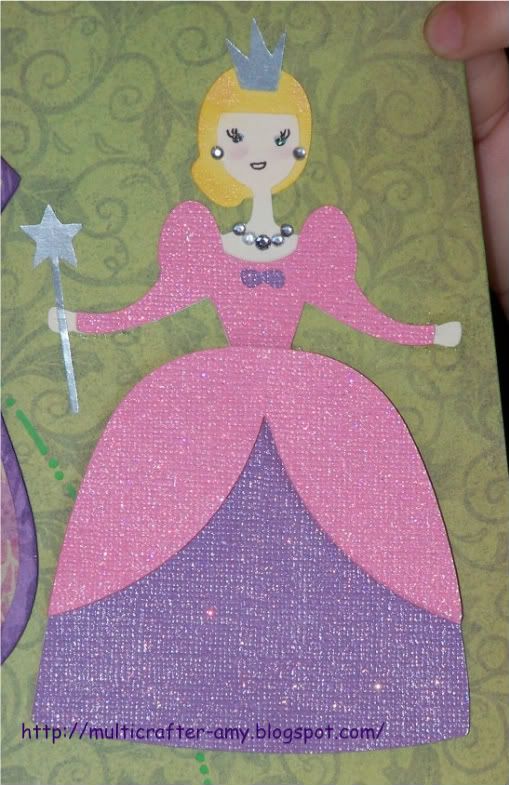
 The princess is cut from the Birthday Cakes cartridge that is designed for the Cricut Cake Machine. So it does not have a bunch of layers for it so I made more by cutting extra layers in different colors and my handy scissors. I used two pink glitter cardstock cuts of the dress to make it pop. I wanted the bottom part to poof out so I made a second of the same cut and cut it at the waist and just used the bottom part and foam squares. I also cut two bottom layers. I cut one flesh tone and one in purple glittler cardstock and trimmed with a scissors where needed. Her face was drawn on by using a piece cut with the face as a stencil and hand drawn eyelashes. I used hide contour to hide her face on the flesh tone paper. Then I chalked her face to add life and some rhinestones for her jewelery. I used a cream metallic chalk for her hair. I just barely used aqua Stickles for her eyes.
Cartridges used
Birthday Cakes - Princess, Castle, Number5, Title
Celebrate with a Flourish - Cake
Storybook - To make the frame
Plantin Schoolbook - Tags and square for the frame cut out.
Winnie the pooh and Friends – Clouds
Paper used
Printed paper is from a paper stack- Inspirations by Memory Block
Purple, Pink, White glitter paper.
Blue cardstock
Silver metallic paper
Martha Stewart glitter, Ribbon by Offray
Please check back for my other two layouts. I will post them later today. Please leave a comment below. I like your feedback. Also if you like my work, please follow me. I have a lot of projects in the works that I will be posting soon.

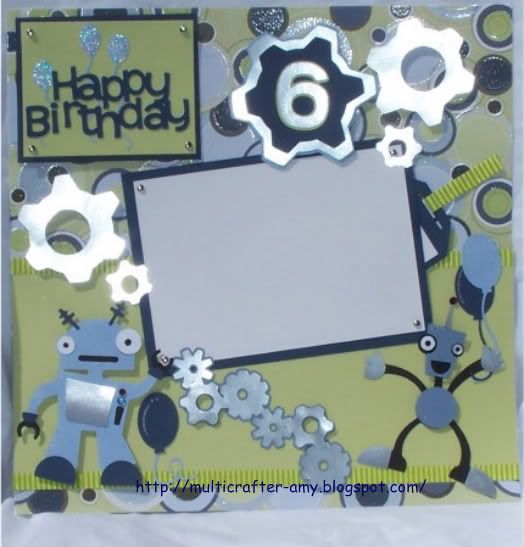 I have been wanting to use my Robotz cartridge that I just had to have. I might use this them for middle son's 6th birthday later this year. I just love how these little robots turned out. My boys were so interested in this page. They wanted the extra robots that I made. So why not. They then made their own projects while I worked on the challenge. I used a lot of Metallic Paper on this layout. The paper I used as the base was so busy. It was specialty paper. The picture does it no justice. It had metallic shine to it. I toned it down by using a lot of solid paper. The robots had to have some bling for the antenna and the buttons. See I may have boys but there is always a way to add sparkle. The robots had to have balloons for the birthday party theme. I also used silver little brads. I place the one robot to look like he was turning the brad. I also used foam squares to pop him up on the page. The other robot just looks like he is having a blast don't he? I cut double of his main body parts (blue parts) and foam squared them to add dimension to his body. I also used foam squares for the title, gears and layered gear with the number six. The light green base paper is trimmed with some self adhesive ribbon. I also used that ribbon on the journal tag. I know these photos are not the best but I was in a hurry to get this shipped out for the contest in time. I am also in the process of making my own light box to be able to take brighter pictures.